donkey-kong
Donkey Kong: Rush
AI Disclaimer
During the preparation of this work, the authors used GitHub Copilot and DeepL to assist with writing the Javadoc and to check the grammar of this report. Moreover, Copilot has been used as a review tool in some pull requests on GitHub. After using this tool/service, the authors reviewed and edited the content as needed and take(s) full responsibility for the content of the final report/artifact.
Abstract
This report presents the “Donkey Kong: Rush” project, realized for the “Distributed System” course at the University of Bologna. The project involves the development of a 2D multiplayer platform video game inspired by the classic Donkey Kong. The system is designed around an Entity-Component-System (ECS) architecture written in Java, utilizing JavaFX for rendering. The main focus of the project is the implementation of smooth multiplayer gameplay. The solution combines the Host’s authority over the deterministic environment with a reactive handling of local inputs, guaranteeing an experience free of blocking lag for the players.
1. Concept
“Donkey Kong: Rush” is a desktop application featuring a graphical user interface (GUI). Specifically, it is a 2D multiplayer platform video game, which takes inspiration from the original Donkey Kong arcade game.
1.1 Use case description
The software provides a competitive multiplayer platforming experience. Users are located on separate desktop machines connected over the same local area network. Thus, distribution is a fundamental requirement for this project to enable a seamless multiplayer experience, as it allows players on physically separate machines across a network to connect, interact, and share the same virtual space.
Interaction is continuous and in real-time during an active game session. The system captures inputs and exchanges state updates across the network multiple times per second to maintain synchronization.
Players interact with the system via the GUI during setup or keyboard controls during the game. The game controls consist of standard keybindings for movement (left/right, climbing ladders) and jumping.
The system does not require persistent, long-term data storage. All necessary data represents the state of the ongoing match (such as player and barrel coordinates) and is kept strictly in RAM.
The game relies on multiple user roles:
- Host (Player): Actively plays the game, processes their own local input, and acts as the local server. It possesses authority over the game environment (e.g., generating barrels) and broadcasts the world state to all connected clients.
- Guest (Player): Actively plays the game by processing their own input locally while simultaneously receiving continuous updates from the Host regarding the rest of the world state.
- Spectator: A purely passive role that does not generate game input, but solely receives updates from the players to feed its local rendering system, allowing another user to watch the match in real-time.
2. Requirements Elicitation and Analysis
Glossary
| Term | Definition |
|---|---|
| Host | A player who actively plays the game, processes local input, acts as the authoritative entity for game-world generation (e.g., barrels), and broadcasts the state to clients. |
| Guest | A player who actively plays the game, processes local input, and receives continuous world state updates from the Host. |
| Spectator | A passive user who does not generate input but receives real-time updates to render and watch the match. |
| Lobby | The pre-game networking state where users connect and are assigned their respective roles (Host, Guest, or Spectator) before the match begins. |
| Entity | Any distinct object in the game world. |
| Barrel | A dynamic entity that deals damage when a player comes into contact with it. |
| Ladder | A climbable entity in the game level that enables players to move vertically regardless of gravity. |
Functional Requirements
| Description | Acceptance Criterion | |
|---|---|---|
| The system must allow users to join a lobby and automatically assign them a role (Host, Guest, or Spectator) based on join order or preference. | A user successfully connects to the server and receives a distinct role assignment (Host, Guest, or Spectator) before the game starts. | |
| The system must allow active players to move horizontally (left/right), jump, and climb ladders. | Pressing the designated keys updates the player’s position appropriately on the screen according to game physics (gravity, collision). | |
| The system must synchronize the game state (entities positions, and lives) between all connected clients in real time. | When the Host moves or a barrel spawns, the Guest and Spectators see the updated positions on their screens without noticeable desynchronization. | |
| The system must detect collisions between players and damaging entities (e.g., barrels), deducting a life upon impact. | When a player’s character intersects with a barrel, the player’s life count decreases by 1, and the character respawns at the starting position. | |
| The system must declare a winner if a player reaches the goal (Pauline) or declare a loser if a player’s lives reach zero. | The game transitions to a “Game Over” screen displaying the correct winner or loser when the goal is touched or 3 lives are lost. |
Non-Functional Requirements
These requirements define the behavioral aspects and quality attributes of the system.
| Description | Acceptance Criterion |
|---|---|
| The game must update and render at a consistent frame rate to ensure smooth gameplay. | The local game loop executes consistently at the target of 60 Frames-Per-Second (FPS). |
| State updates must be transmitted rapidly to prevent visual stuttering or unfair advantages. | State update payloads are serialized, transmitted over the local network, and deserialized by the receiving client in under 33 milliseconds (roughly 2 frames). |
| The system must ensure automatic recovery from disconnections for non-Host users. | If a Guest or Spectator loses their network connection and subsequently reconnects to the server while the match is still active, the system automatically restores their role and resumes sending them real-time game state updates without requiring a full lobby reset. |
| Code must be modular and documented to make extensions and changes easy. | Modularity is enforced by strictly decoupling data structures from execution logic, avoiding deep and rigid inheritance trees. Maintainability is verified by the presence of comprehensive Javadoc comments on all core API interfaces, ensuring new features can be integrated rapidly. |
2.1 Relevant Distributed System Features
-
Performance, concurrency, and communication efficiency: Real-time games require extremely strict throughput and response times. The system must process player inputs, update physics, and broadcast network messages concurrently without blocking the main application thread. High communication efficiency is paramount to ensure state updates are delivered within the 33ms latency threshold to maintain a fair 60 FPS gameplay experience.
-
Evolvability and maintainability: To ensure long-term maintainability and ease of updates, the system’s architecture must strictly decouple game state data from execution logic. The design must allow new game mechanics or virtual objects to be added modularly, actively avoiding rigid, monolithic class hierarchies.
-
Fault tolerance, dependability, and availability: While data integrity for long-term storage is irrelevant since all match state is kept in volatile memory, the system must gracefully handle network faults. If a player’s connection drops, the central server must detect the failure and immediately broadcast a game-over message, resetting the lobby to prevent deadlocks and ensure continued availability for future matches.
-
Resource sharing: The active game world acts as a synchronized shared resource. The Host is responsible for managing authoritative game mechanics and synchronizing this shared state with the Guest and Spectators via continuous network message broadcasts.
-
Transparency: The system provides basic location transparency; clients seamlessly connect to the lobby without needing to know the physical network topology of the other players. However, failure transparency is intentionally absent; if a connection drops, the failure is explicitly exposed to the remaining users via the game over UI.
-
Scalability: The game is explicitly bounded to a small, finite number of simultaneous connections (one Host, one Guest, and passive Spectators) on a local area network. It is not expected to scale horizontally to thousands of users or handle massive data growth over time.
-
Security and trust: As a local LAN game without persistent user accounts or sensitive data storage, there is no need for cryptographic schemes, data encryption, or complex authentication mechanisms.
-
Openness and interoperability: The project is a closed ecosystem. While it utilizes standardized text formats for message passing, it is not required to interact with external third-party systems or heterogeneous technological components.
-
Economy and costs: Developed as an academic project running on local hardware, there are no cloud deployment budgets, operational costs, or strict economic constraints driving the architecture.
Design
This chapter explains the strategies used to meet the requirements identified in the analysis.
Architecture
The project follows the Model-View-Controller (MVC) and Entity-Component-System (ECS) architectural patterns. The MVC pattern is used to separate the user interface from the game logic, while the ECS pattern is used to manage the game entities and their behaviors.
For what concerns the distributed aspect of the project, a client-server architecture is used. The host player act as both the client and the server, while the other player and any spectators act as clients. The server is responsible for managing the game state and broadcasting updates to all connected clients.
This architecture was selected for its simplicity, efficiency, low latency, and ability to abstract complexity from the user. A decentralized peer-to-peer alternative, where each user operates an interconnected server, was evaluated but rejected due to high implementation complexity and network latency overhead. Its sole advantage, mitigating the single point of failure if a central leader goes offline, did not justify the operational trade-offs.
3 Design
This section details the architectural and structural decisions made to fulfill the system’s requirements.
3.1 Architecture
The project follows the Model-View-Controller (MVC) and Entity-Component-System (ECS) architectural patterns. The MVC pattern is used to separate the User Interface (UI) from the game logic, while the ECS pattern is used to manage the game entities and their behaviors.
Regarding its distributed nature, the system utilizes a centralized Client-Server architecture heavily reliant on an Event-Driven model. The server acts as a central authoritative game lobby and message relay, while the clients maintain local instances of the game. This design minimizes peer-to-peer connection issues and provides a single source of truth for matchmaking, role assignment, and fault management.
3.2 Infrastructure
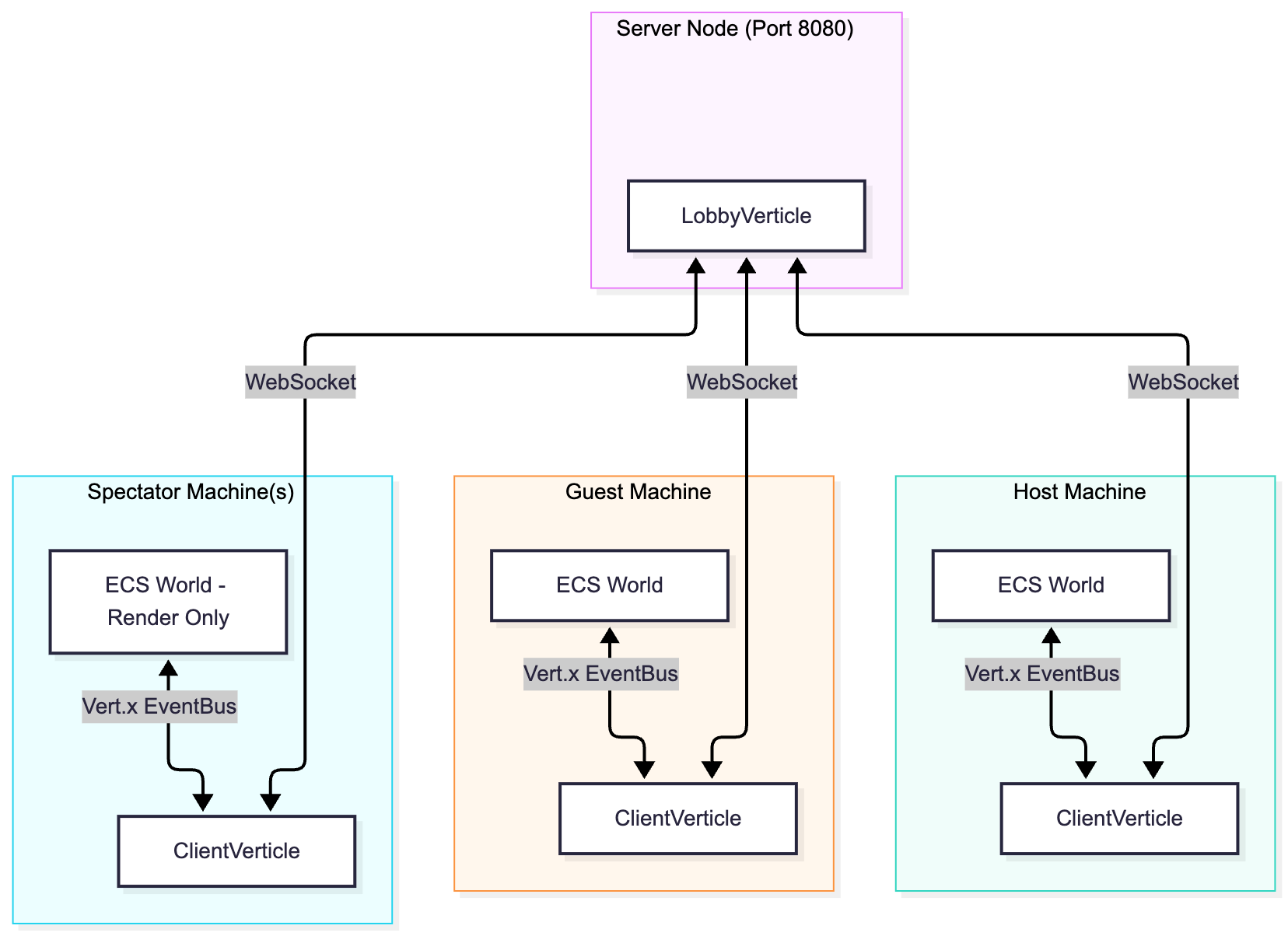
To support the game’s multiplayer requirements, the infrastructure relies on a centralized star topology where all network traffic flows through the main server.
- Infrastructural Components:
- Game Server (
LobbyVerticle): A single server component responsible for accepting connections, storing the active socket states (onehostSocket, oneguestSocket, and a list ofspectators), and brokering messages. - Clients (
ClientVerticle): Instances running on the players’ local machines that establish aWebSocketClientconnection to the server.
- Game Server (
- Network Distribution:
- The server is deployed on a machine accessible to all players, acting as the central node. It exposes its services over a single TCP port, listening on port 8080.
- Clients are distributed edge nodes that do not communicate directly with one another. When the Host acts and
generates a
HostUpdateMessage, it sends the data (including player coordinates, state, lives, and barrel data) to the server, which then mirrors this data to the Guest and all Spectators.
- Component Discovery and Addressing:
- Clients discover and connect to the server using a predetermined IP address (
hostIp) and port (8080), configured upon client initialization. - Role-based addressing is handled via endpoint paths and connection order. Standard players connect to the root path,
where the server automatically assigns the
HOSTrole to the first connection and theGUESTrole to the second. Observers use a distinct discovery mechanism by connecting to the specific URI path/spectate, which routes them directly into the server’sspectatorspool.
- Clients discover and connect to the server using a predetermined IP address (
3.3 Modelling
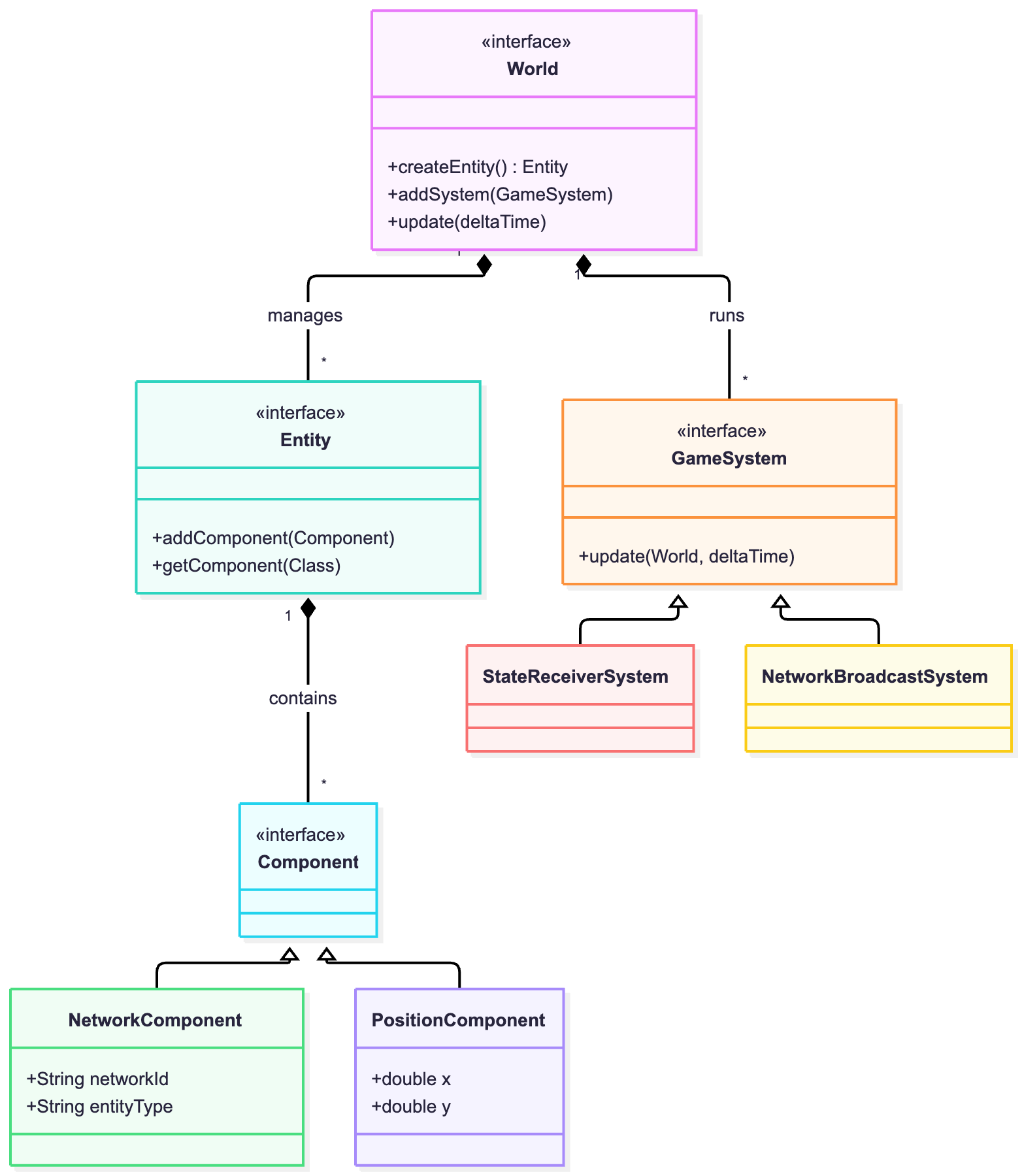
- Domain Entities: In “Donkey Kong: Rush”, the primary domain entities are the
World(the container of the game state), thePlayer(representing either the Host or Guest avatars), theBarrel(dynamic obstacles), and static elements likeLadderandPlatform. - Mapping to Infrastructural Components: The system employs a replicated state model rather than a pure thin-client approach. Both the
LobbyVerticle(Server) and theClientVerticle(Clients) maintain representations of the game state.- The Server acts as a stateless message broker; it does not simulate physics but relies on the Host’s computational authority.
- The Clients hold the actual state of the game within their local
WorldImplinstance, processing physics and rendering the GUI. The Host generates authoritative data (e.g., barrel spawns) and maps this to the Server via events.
- Domain Events: Core events include
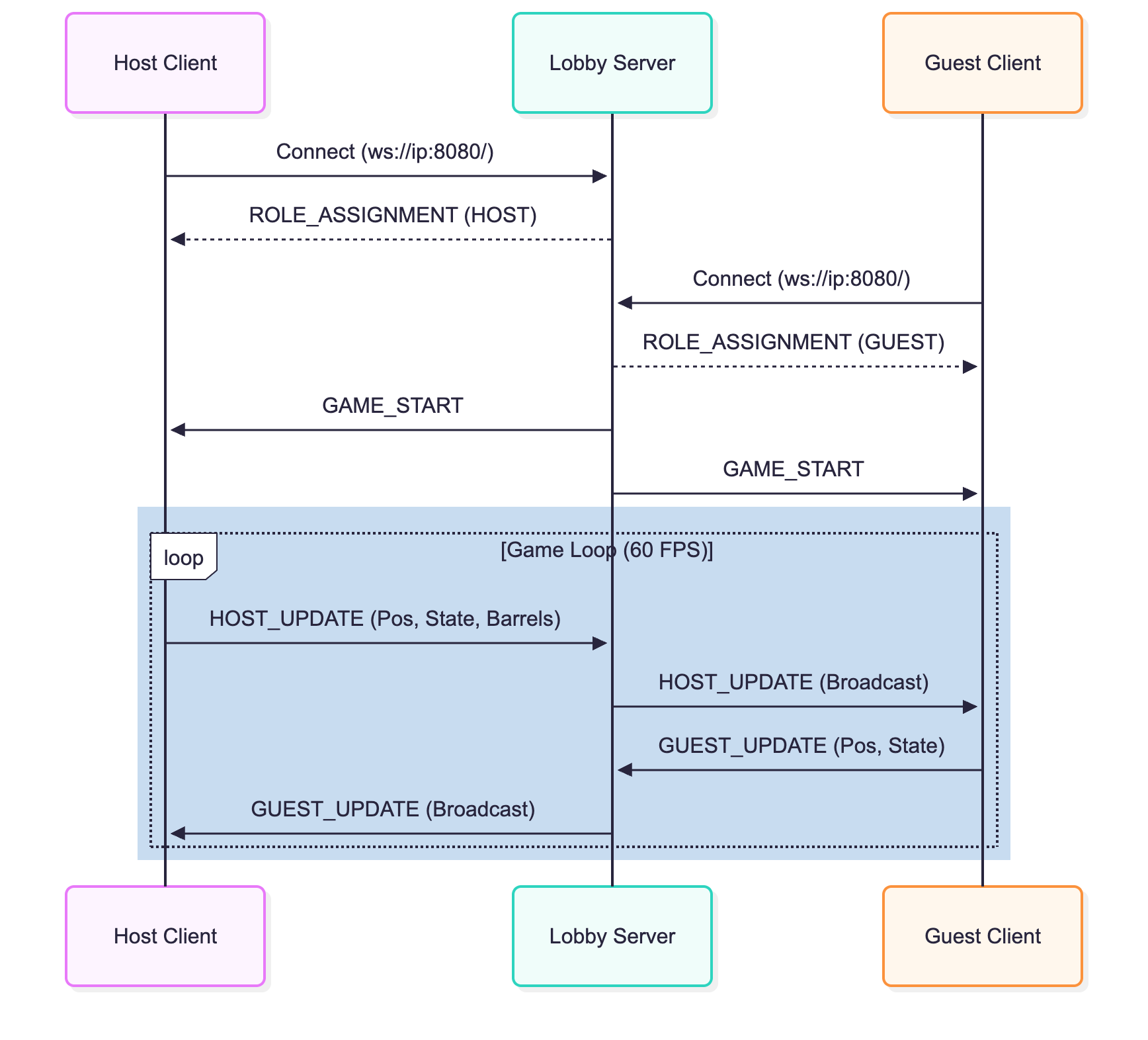
GAME_START(which initializes the simulation on all nodes),HOST_UPDATE(transmitting the Host’s position and global entity data),GUEST_UPDATE(transmitting the Guest’s position), and terminal events likeGOAL_REACHED,PLAYER_DIED, orGUEST_DISCONNECTED. - Messages Exchanged: The system relies primarily on state-update messages rather than pure command messages. Instead of sending discrete inputs (e.g., “Player moved left”), clients exchange high-frequency serialized snapshots of their entities (e.g., “Player X is at coordinate Y with state MOVING”).
- System State: The distributed state encompasses the positional coordinates, state machines (e.g., jumping, falling, idle), facing directions, and remaining lives of the connected players, alongside the active network IDs and positional coordinates of all dynamic barrels in the arena.
3.4 Interaction
- Communication Channels: Components communicate bidirectionally using a persistent
WebSocketconnection. TheClientVerticlepushes messages onto the local Vert.xEventBus, which are then transmitted over the network to theLobbyVerticle. The Server broadcasts these messages back to the appropriate endpoints (either to the opposing player or to all Spectators). - Timing and Frequency: Interaction is continuous. State update messages (
HostUpdateMessageandGuestUpdateMessage) are fired iteratively during theGameLoop(running at a target of 60 frames per second). Event-triggered messages (likeENTITY_DESTROYED) are communicated asynchronously only when a specific collision resolves locally. - Interaction Patterns: The system enacts a Publish-Subscribe / Broadcast pattern mediated by the Server. The Host publishes the state of the authoritative world, to which Guests and Spectators are inherently subscribed. Concurrently, it implements a Client-Server RPC-like pattern for matchmaking, where the client explicitly requests a connection and waits for the server to reply with a
ROLE_ASSIGNMENT.
3.5 Behaviour
- Individual Component Behavior:
- The Host Client is highly stateful and authoritative. It responds to local keyboard events by updating its own physics and spawning barrels on an internal timer (
SpawnSystem). It then blindly pushes this definitive state outwards. - The Guest Client is stateful but semi-authoritative. It computes its own player physics independently in response to local keyboard events, but acts purely reactively regarding barrels, spawning or removing them locally only when instructed by a
HOST_UPDATEmessage via theStateReceiverSystem. - The Spectator Client is passive and purely reactive. It does not update the
Worldbased on elapsed time (deltaTime), but strictly overwrites entity positions based on incoming network messages to render the current frame.
- The Host Client is highly stateful and authoritative. It responds to local keyboard events by updating its own physics and spawning barrels on an internal timer (
- State Updating Mechanism: The state is updated continuously via the ECS architecture. During each frame of the
AnimationTimer, theWorldImpl.update()method iterates through all activeGameSystems (e.g.,MovementSystem,PhysicsSystem). TheStateReceiverSystemis explicitly in charge of capturing incoming network updates from the Vert.xEventBusand applying those external coordinate changes to the local entities before the next render cycle.
3.6 Data and Consistency Issues
- Transient Storage: The system does not utilize persistent data storage (e.g., SQL, NoSQL, or key-value databases). All data generated during a session—such as entity coordinates, physical velocities, and life counts—represents the active, ephemeral game state. This data is stored exclusively in volatile memory (RAM) within the
WorldImplinstance of each client. This architecture strictly reflects the session-based arcade nature of the game, which deliberately lacks user accounts, persistent leaderboards, or save files. - Database Queries: As there is no persistent storage layer, there are no database queries, concurrent database reads/writes, or transactional locks to manage.
- Shared Data: The physical state of the game world is highly shared among all distributed components. The Host actively shares the coordinates of its avatar and all dynamic environmental entities (barrels). The Guest shares its local avatar’s coordinates. Spectators share no data but receive all shared state.
- Consistency Model: The game relies on a continuous state-replication model rather than strict transactional consensus. The Host is the definitive source of truth for the game environment, while the Guest acts as the source of truth for its own movement. Consistency is maintained through high-frequency network broadcasts (running at the target 60 FPS). In the event of network latency, a client’s local
MovementSystemwill predictively extrapolate entity positions. However, incoming network messages will forcefully correct and overwrite these local predictions with the authoritative coordinates, ensuring eventual consistency without the overhead of distributed locks.
3.7 Fault-Tolerance
- Data Replication and Sharing: The system’s architecture inherently relies on a continuous state-replication mechanism to maintain synchronization across the network. The ephemeral game state (encapsulated within the ECS
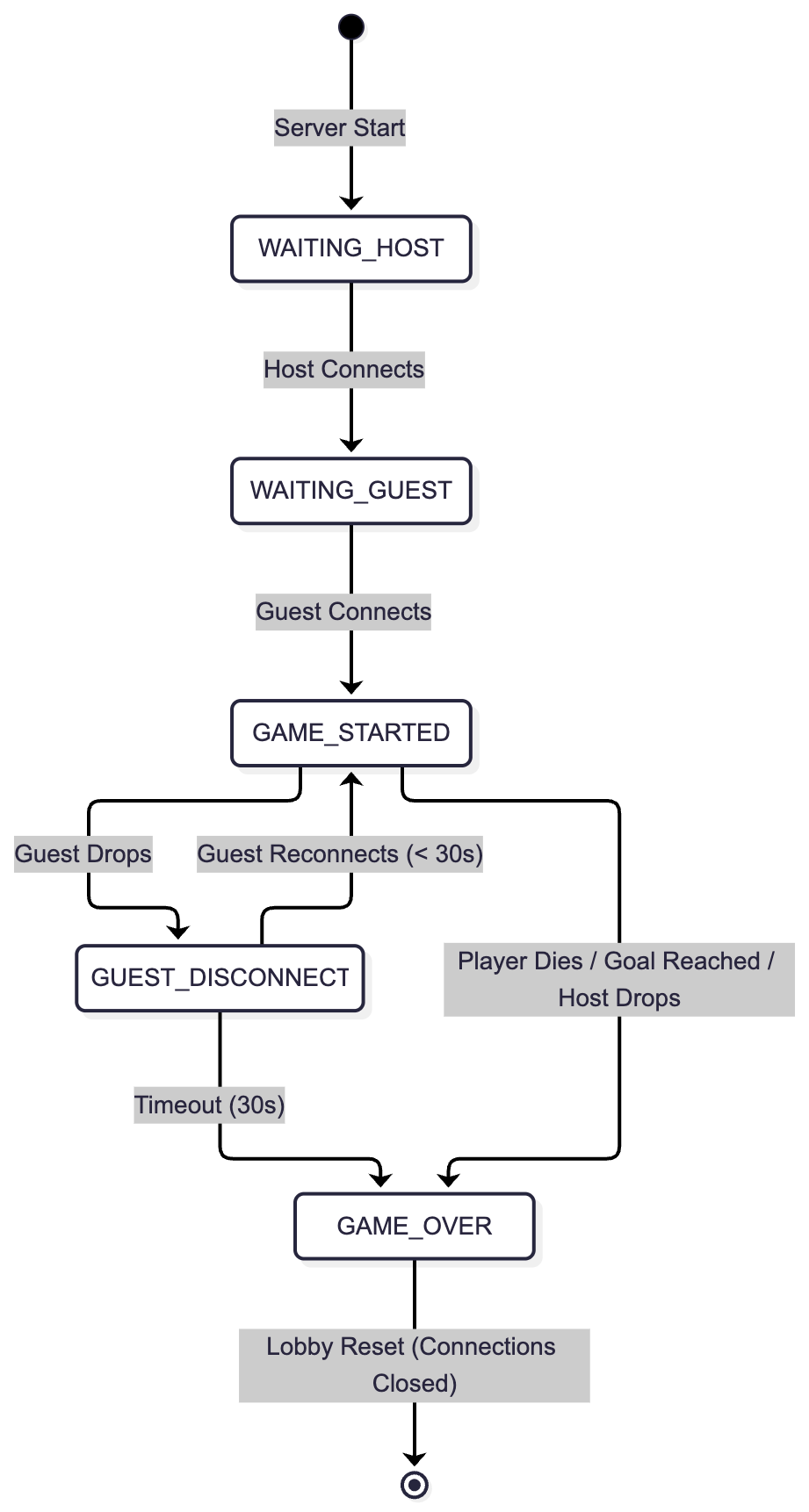
Worldinstance) is actively replicated across all connected nodes rather than federated. The Host serves as the definitive source of truth, replicating the state of dynamic entities (such as barrels) and its own avatar to both the Guest and Spectators. Simultaneously, the Guest shares its local avatar’s coordinates, which are replicated back to the Host. Spectators maintain a read-only replicated state, ensuring their local simulation mirrors the active game without interfering with it. - Heart-beating, Timeout, and Retry Mechanism: To handle transient network instability (e.g., temporary Wi-Fi drops on a local area network), the central
LobbyVerticleimplements a dedicated timeout and retry mechanism specifically tailored for the Guest connection. If the Guest’s WebSocket closes unexpectedly while the game is active, the server does not immediately terminate the match. Instead, it pauses active event broadcasting for that node and initiates a 30-second timer (guestReconnectTimerId). If the Guest successfully reconnects within this 30-second window, the server transmits a specific payload (isReconnect: true), and the Host replies with aRESTORE_STATEmessage containing the exact coordinates and lives count of the Guest just before the drop, seamlessly resuming the game. If the timeout expires without a successful reconnection, the server declares aGUEST_TIMEOUTand resolves the match in favor of the Host. - Error Handling and Component Failure: The system relies on event-driven error handling to prevent deadlocks and ghost sessions:
- Host Failure: Since the Host holds the authoritative state of the game world, a sudden disconnection of the Host’s socket is unrecoverable. The server detects the closure, immediately broadcasts a
GAME_OVERmessage (with the reasonHOST_DISCONNECTED) to the Guest and Spectators, and flushes the lobby state, reopening port connections for a brand-new match. - Spectator Failure: The system enforces strict isolation for passive observers. If a Spectator disconnects or crashes, the server simply evicts their socket from the internal
spectatorsarray. This failure is completely transparent to the active players and does not impact the game loop or the server’s stability.
- Host Failure: Since the Host holds the authoritative state of the game world, a sudden disconnection of the Host’s socket is unrecoverable. The server detects the closure, immediately broadcasts a
3.8 Availability
- Caching Mechanism: Traditional distributed data caching (e.g., Memcached or Redis) is not utilized because the game state is highly volatile, changing every 16 milliseconds to maintain a 60 FPS target. However, at the local client level, a strict asset caching mechanism is implemented within the
RenderingSystem. Visual resources are loaded and sliced into sprite sheet frames only once upon initialization and stored in local memory (assetCacheandsourceImageCache). This prevents continuous disk I/O operations and memory reallocation during the intensive rendering loop, ensuring the client remains highly responsive and visually available. - Load Balancing: Load balancing is neither implemented nor required for this specific architecture. The system’s scope is strictly bounded to a local area network supporting a single active game session per server instance (hardcoded to one Host, one Guest, and a passive array of Spectators). If the system were to be scaled for a wider internet deployment (e.g., a matchmaking hub hosting hundreds of concurrent Donkey Kong arenas), a reverse proxy (like Nginx) or a dedicated matchmaking service would be necessary to dynamically balance incoming WebSocket connections across multiple horizontally scaled
LobbyVerticleworker nodes. - Network Partitioning: In the context of the CAP theorem, the system deliberately prioritizes Consistency (C) over Availability (A) during a network partition. If a partition isolates the Guest from the Server, local gameplay cannot proceed independently, as a desynchronized competitive platformer would result in unfair and invalid states (e.g., a player passing through a barrel on their screen, but being hit on the opponent’s screen). The server handles the partition by enforcing a hard pause on state updates via the aforementioned 30-second fault-tolerance window. If the partition cannot be resolved within this timeframe, the server destroys the active game session to become available again for new, healthy connections.
3.9 Security
- Authentication: The system does not implement formal authentication mechanisms such as OAuth 2.0, JWT (JSON Web Tokens), or session cookies. Given the academic, local LAN scope of the project and the intentional absence of persistent user accounts or leaderboards, clients are implicitly trusted simply by successfully establishing a TCP/WebSocket connection to the server’s IP address.
- Authorization: While formal authentication is absent, a rudimentary form of Role-Based Access Control (RBAC) is enforced by the
LobbyVerticlethrough connection routing and temporal ordering. Access rights are rigidly determined by the URI path utilized during the initial handshake:- HOST Role: Assigned to the first WebSocket connecting to the root
/playendpoint. This role is granted the highest authorization, including the rights to dictate global game state, spawn barrels, and trigger game-over conditions. - GUEST Role: Assigned to the second WebSocket connecting to the
/playendpoint. This role is strictly authorized to broadcast updates regarding its own specific entity (the Guest player avatar) and cannot manipulate the environment. Any attempt by a Guest to spawn a barrel would be ignored by the server’s routing logic. - SPECTATOR Role: Assigned to any WebSocket connecting to the
/spectateendpoint. This role is granted strictly read-only access. The server pushes updates to these clients but does not listen to or process any state-update messages originating from them.
- HOST Role: Assigned to the first WebSocket connecting to the root
- Cryptographic Schemas: No cryptographic schemas, token verification, or in-transit data encryption protocols are employed. Messages are serialized as plaintext JSON and transmitted over standard, unencrypted WebSockets (
ws://rather thanwss://). This is a deliberate architectural trade-off: the game processes no sensitive personal data (PII), financial records, or credentials. Consequently, prioritizing raw throughput and minimal latency over encryption overhead is the optimal choice for a local, real-time multiplayer application.
4 Implementation
This chapter details the specific technology-dependent choices made to realize the architectural design, focusing on network protocols, data serialization, and the frameworks exploited.
- Network Protocols: The system utilizes WebSockets (WS) over TCP for all network communication. While standard HTTP is strictly request-response, WebSockets provide a persistent, full-duplex communication channel. This is absolutely critical for a real-time multiplayer game running at 60 FPS, as the server needs to push state updates continuously to all clients without waiting for explicit requests. While UDP is traditionally used for fast-paced games to avoid TCP’s head-of-line blocking, WebSockets were chosen because they provide guaranteed, ordered delivery out-of-the-box, drastically simplifying the implementation for a local area network (LAN) environment where packet loss is negligible.
- In-transit Data Representation: All data exchanged over the network is serialized and represented in JSON (JavaScript Object Notation). The payloads are formatted as simple stringified JSON objects containing key-value pairs for coordinates, entity states, and active identifiers (e.g.,
{"type": "HOST_UPDATE", "playerX": 10.5, "lives": 3}). While binary formats like Protocol Buffers (gRPC) would offer smaller payload sizes and faster serialization, JSON was selected for its native integration with the networking framework, its human-readability which greatly sped up debugging, and its sufficient performance over a local network. - Database Queries: As extensively discussed in the Design section, the system does not utilize any persistent storage. Consequently, there are no SQL or NoSQL databases queried, and the application relies entirely on volatile memory (RAM) to manage the game state during runtime.
- Authentication and Authorization: The implementation does not utilize standardized authentication protocols (such as OAuth 2.0 or JWT) nor formal authorization frameworks (like ABAC). The system implements a custom, lightweight Role-Based Access Control (RBAC) enforced programmatically by the server based solely on the WebSocket connection endpoint (
/playvs/spectate) and the chronological order of connections.
4.1 Technological Details
The project relies on a specific technology stack to achieve its concurrency and rendering goals:
- Java (JDK 21+): The entire application is written in Java, taking advantage of modern language features. In particular, Java
recordclasses are extensively exploited to define immutable ECS Components (e.g.,PositionComponent,VelocityComponent), ensuring thread safety and reducing boilerplate code. - Eclipse Vert.x: This is the core framework used for networking and concurrency. Vert.x is built on a non-blocking, event-driven architecture (using the Reactor pattern), which allows it to handle multiple concurrent WebSocket connections with minimal thread overhead.
- The
LobbyVerticleacts as the HTTP/WebSocket server. - The
ClientVerticlemanages the client-side WebSocket. - The internal Vert.x EventBus is heavily exploited to decouple the network layer from the game logic layer. Incoming network messages are pushed to the EventBus, where the ECS
StateReceiverSystemconsumes them asynchronously, preventing network operations from blocking the main game loop.
- The
- JavaFX: Used exclusively for the client-side graphical user interface (GUI) and rendering. The game does not use traditional JavaFX UI controls for the gameplay; instead, it utilizes a raw
Canvasand aGraphicsContextto manually draw and clear sprite sheets frame-by-frame. The core game loop is driven by a JavaFXAnimationTimer, which fires the ECSWorld.update(deltaTime)method to process physics and render the graphics concurrently at a targeted 60 FPS. - Custom ECS Engine: Rather than relying on a heavy third-party game engine (like LibGDX), the project implements a custom Entity-Component-System from scratch. This allows for total control over the modularity of the code, separating pure data (
Component) from execution logic (GameSystem), making the implementation of network state synchronization straightforward and predictable.
5 Validation
To ensure the reliability, correctness, and performance of the distributed game, the system was subjected to a rigorous testing phase, divided into automated testing for core logic and manual acceptance testing for gameplay feel and GUI responsiveness.
5.1 Automatic Testing
Automated testing was implemented using JUnit 5 and managed via the Gradle build tool. The tests are executed automatically within a Continuous Integration (CI) pipeline using GitHub Actions (ci.yml and pr-checks.yml), ensuring that every pull request is validated before being merged. Tests can be run locally by executing ./gradlew test via the command line interface.
- Unit Testing:
Individual components, specifically the pure execution logic within the ECS architecture, were strictly unit-tested in isolation.
- Rationale: To verify that game physics, entity interactions, and boundary limitations work deterministically without spinning up the network or the graphical interface.
- Implementation: Tests such as
PhysicsSystemTest,GravitySystemTest, andMovementSystemTestinitialize a mockWorld, inject entities with specificComponentsets, manually invoke the system’supdate(deltaTime)method, and assert the resulting state. For example,BoundariesSystemTestacts as a corner-case test by placing an entity outside the screen coordinates and asserting that the system clamps its position back within the allowed arena. - Requirements Tested: Verifies the functional requirements related to horizontal movement, jumping, and collision detection.
- Integration Testing:
Communication and interaction among components, particularly the network layer, were tested using integration tests.
- Rationale: To verify that the Vert.x components correctly bind to ports, handle WebSocket handshakes, route messages through the EventBus, and correctly manage the state machine of the multiplayer lobby.
- Implementation: The
LobbyVerticleTestandClientVerticleTestutilizeVertxTestContextto deploy the server and client verticles in a sandboxed, asynchronous test environment. These tests simulate the connection of multiple clients to verify the automatic role assignment (e.g., ensuring the first connection becomes the Host and the second becomes the Guest). Furthermore,EndGameScenariosTestandWinSystemTestsimulate the integration between the collision logic and the network broadcast, asserting that terminal states trigger the correct game-over messages. - Corner Cases Tested: The tests specifically validate error handling and network partitions, such as simulating a client disconnection to ensure the server gracefully resets or starts the 30-second fault-tolerance timer.
- End-to-End (E2E) Testing: Fully automated End-to-End testing—spinning up the production server, launching multiple headless JavaFX client instances, simulating network latency, and injecting programmatic keyboard inputs—was deemed out of scope due to the extreme brittleness of automated GUI testing for real-time games. E2E validation was instead covered through manual acceptance testing.
5.2 Acceptance Test
Manual testing was a critical phase of the validation process, conducted in a production-like local area network (LAN) environment with multiple physical machines.
- What was tested:
- UI/UX Flow: The transition from the Main Menu to the active game, and finally to the Game Over screen.
- Network Synchronization: The visual coherence of the game state between the Host, Guest, and Spectator screens. This involved verifying that barrel spawns and player movements did not suffer from “rubber-banding” or visual desynchronization.
- Gameplay Feel: The responsiveness of the keyboard inputs (jump height, movement speed) and the consistency of the 60 FPS rendering loop.
- Fault Recovery: Physically disconnecting the Wi-Fi on the Guest machine to verify that the game paused, the 30-second timer started on the server, and the state was correctly restored upon reconnection.
- Why wasn’t it automatic? While the mathematical determinism of the physics engine and the routing logic of the network were easily covered by automated unit and integration tests, subjective quality metrics cannot be automatically asserted. The “smoothness” of the JavaFX Canvas rendering, the tactile responsiveness of the controls, and the human perception of network latency require manual observation. Furthermore, automating the disconnection of physical network adapters across distributed machines to test the fault-tolerance window would require a highly complex and fragile infrastructure that exceeds the academic scope of this project.
6 Deployment
This section outlines the process required to deploy and run “Donkey Kong: Rush” on a local machine. The deployment strategy focuses on simplicity, leveraging the Gradle build automation tool to manage dependencies and execution without requiring complex manual configurations.
Prerequisites
Before deploying the software, the target machine must meet the following software requirements:
- Java Development Kit (JDK): Version 21 or higher must be installed.
- Environment Variables: The
JAVA_HOMEenvironment variable must be correctly configured and pointing to the JDK 21 installation path. - Operating System: A desktop operating system with a graphical windowing environment (Windows, macOS, or a Linux distribution with X11/Wayland).
- Network: An active Local Area Network (LAN) connection if multiplayer capabilities are to be utilized.
Installation and Execution from Scratch
The software does not require a traditional installer wizard. It is deployed and executed directly from the source code using the included Gradle Wrapper.
- Obtain the Source Code: Clone the repository using Git or extract the provided project archive.
git clone <repository_url> cd donkey-kong-feat-multiplayer - Execute the Application: Run the application using the Gradle Wrapper. This ensures that the exact required version of Gradle is used, eliminating the need for the user to install Gradle manually.
- On Linux / macOS:
./gradlew run - On Windows:
gradlew.bat runExpected Outcomes:
Upon executing the run command, the Gradle Wrapper will automatically download all required third-party dependencies (e.g., Eclipse Vert.x, JavaFX modules, Netty), compile the ECS engine and network logic, and finally launch the DonkeyKongRushUI JavaFX application. The user will be presented with the Main Menu graphical interface, confirming a successful deployment.
- On Linux / macOS:
Configuration Files and Environment Variables
The system is designed to be “plug-and-play” and does not rely on external configuration files (e.g., .env, .yaml, or .properties files). All network configurations, such as the target IP address for the Lobby Server, are intentionally exposed directly through the graphical user interface. This choice maximizes user accessibility, allowing players to establish connections dynamically without modifying text files before deployment.
Containerization Strategy
While modern distributed systems frequently rely on containerization tools like Docker or Kubernetes, “Donkey Kong: Rush” explicitly avoids this deployment model for the following reasons:
- GUI Constraints: Containerizing desktop applications with hardware-accelerated GUIs (JavaFX) requires highly complex X11 socket forwarding or virtual framebuffers (VNC) mapped to the host machine. This significantly degrades rendering performance and frustrates the user experience.
- Embedded Server Logic: The central server (LobbyVerticle) is not a standalone microservice that needs isolated scaling. It is automatically deployed by the Host’s instance of the application at runtime.
- Distribution Format: For production distribution beyond the source code, the deployment pipeline is configured to package the application into a single executable “Fat JAR” containing all dependencies, allowing users to run the game with a simple java -jar donkeykong.jar command, achieving total portability across operating systems without container overhead.
7 User Guide
This section provides a step-by-step guide on how to interact with the “Donkey Kong: Rush” application.
Launching the Game
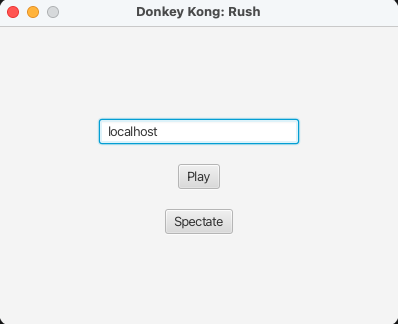
Upon executing the application via Gradle (./gradlew run), the user is greeted by the Main Menu window. This graphical interface provides text fields and buttons to establish network connections.
How to Play
1. Hosting a Game (Player 1)
- Instructions: To start a new game session, simply launch the application and click the “Play” button. If no other server is running on the local network port, your instance will automatically initialize the
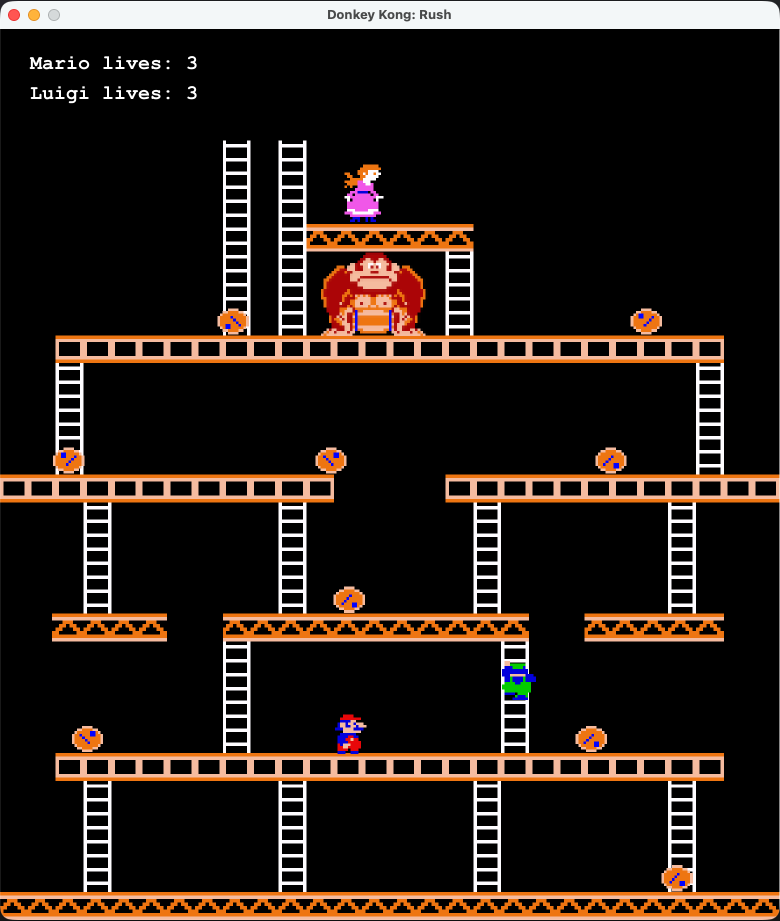
LobbyVerticleserver and connect your client as the Host. - Expected Outcome: The game window will transition to the active arena. You will control Mario (Player 1) and have authority over the game state (including barrel generation). The game will wait for a Guest to connect.
2. Joining a Game (Player 2)
- Instructions: Ensure another player has already hosted a game on the same local network. On the Main Menu, locate the text input field, enter the Host’s local IP address (e.g.,
192.168.1.55), and click the “Play” button. - Expected Outcome: You will connect to the existing lobby and be assigned the Guest role. The match will immediately start, and you will control Luigi (Player 2).
3. Spectating a Game
- Instructions: Enter the Host’s IP address in the text field and click the “Spectate” button.
- Expected Outcome: You will be connected as a passive observer. You will see the active match rendered in real-time, but you will not have an avatar to control.
Gameplay Controls
Once the game has started, active players (Host and Guest) can interact with the environment using the following keyboard bindings:
- Movement:
Left Arrow/Ato move left,Right Arrow/Dto move right. - Climbing:
Up Arrow/Wto climb up ladders,Down Arrow/Sto climb down. - Jumping:
Spacebarto jump over obstacles and gaps.
Game Objective: Navigate your avatar from the bottom of the screen to the top to rescue Pauline. Avoid the rolling barrels spawned by Donkey Kong. If you collide with a barrel, you will lose a life and respawn at the bottom. The game ends when a player reaches Pauline (Win) or loses all 3 lives (Lose), triggering the Game Over screen.
Self-evaluation
- An individual section is required for each member of the group
- Each member must self-evaluate their work, listing the strengths and weaknesses of the product
- Each member must describe their role within the group as objectively as possible. It should be noted that each student is only responsible for their own section
9 Future Works
While the current implementation successfully fulfills the core requirements of a distributed, real-time multiplayer platformer, several avenues for improvement and architectural expansion remain.
Client-Side Prediction and Interpolation
Currently, the Guest and Spectator clients act as “dumb terminals” for external entities, strictly overwriting their local entity coordinates with the incoming network snapshots from the Host. On a high-latency network, this could lead to visual stuttering or “rubber-banding.” A primary future improvement would be implementing Entity Interpolation (smoothing the visual transition between the last known network state and the current one) and Client-Side Prediction (allowing the Guest to predict the physics of barrels locally, correcting them only if the server’s authoritative state deviates significantly).
Scalability and Cloud Matchmaking
The system relies on users manually sharing LAN IP addresses and hosting the LobbyVerticle on their personal machines. To scale this into a production-grade application, the LobbyVerticle could be decoupled and deployed as a standalone microservice on a cloud provider (e.g., AWS or Google Cloud) using Docker and Kubernetes. Furthermore, introducing a Matchmaking Service would eliminate the need for manual IP entry, automatically pairing available clients into isolated game instances dynamically orchestrated by the cloud provider.
Security Enhancements (WSS and Tokens)
Currently, the system uses unencrypted WebSockets (ws://) and implicitly trusts connections based on routing order. A critical future extension would involve upgrading the infrastructure to utilize WebSocket Secure (wss://) by provisioning TLS certificates. Additionally, implementing a lightweight authentication system using JSON Web Tokens (JWT) would prevent malicious users from spoofing the /play endpoint on public networks, ensuring that only authenticated users can claim the Host or Guest roles.
Dynamic Level Progression
From a gameplay perspective, the game currently features a single, hardcoded map generated upon startup via the MapFactory. Future iterations could introduce dynamic map loading (e.g., parsing JSON or Tiled map formats). This would require extending the network protocol to broadcast a LEVEL_LOAD message, ensuring that all distributed clients load and synchronize the same level assets before the GAME_START event is triggered.